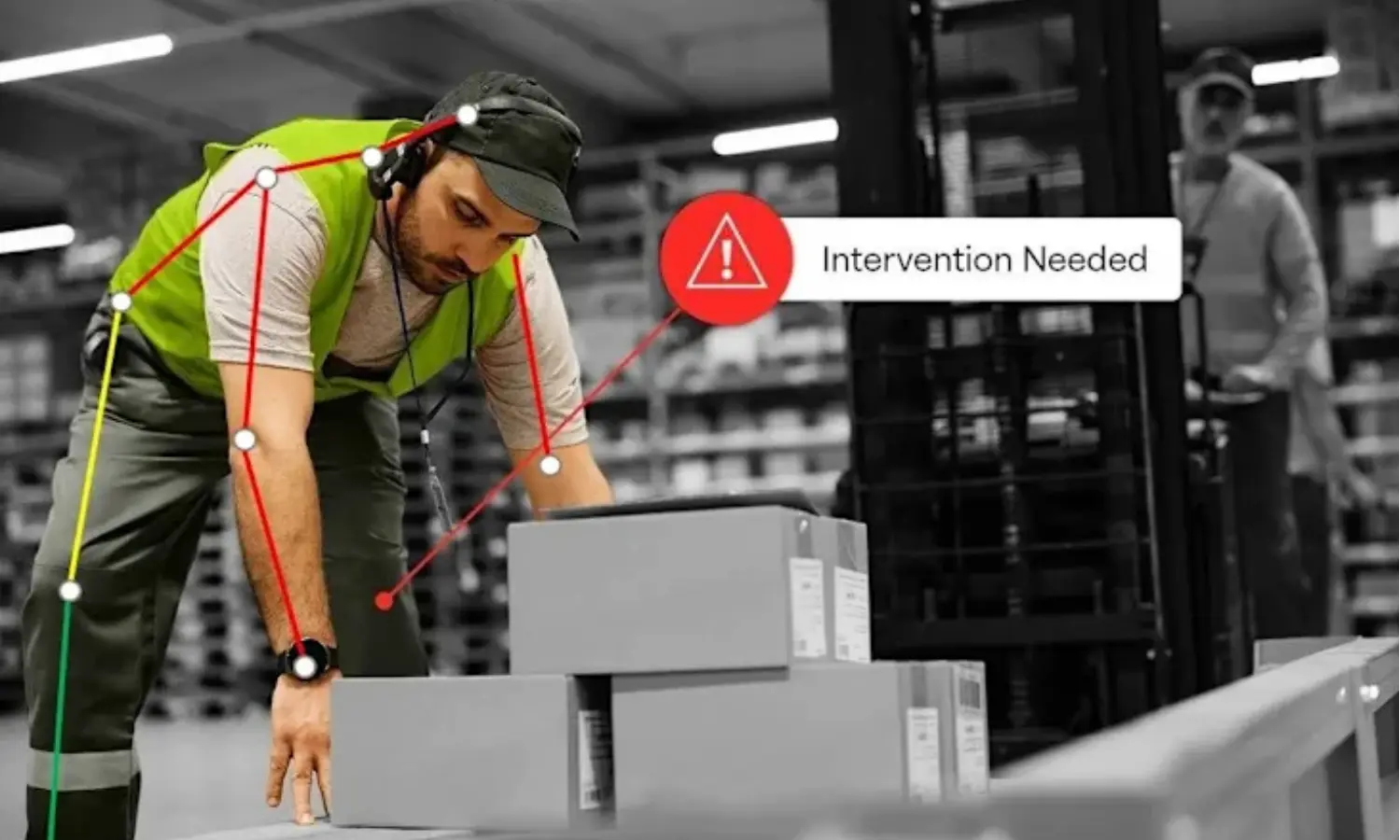
The Challenge
A work video can contain many posture changes, partial views, and short moments that deserve closer ergonomic attention. Reviewing those moments consistently is difficult when the analyst must scrub footage manually and describe posture from memory. The project needed a clearer path from video input to an inspectable posture signal, while keeping ergonomic judgment with a human reviewer.
Our Solution
Sketric Solutions shaped Vergo into a video ergonomic assessment workflow that connects work video, pose landmarks, time-coded REBA scoring, and review. The system exposes intermediate signals instead of reducing a clip to an unexplained pass/fail label. A reviewer can inspect the posture representation and score trace, use the intervention cue as a prompt for discussion, and decide what requires follow-up. The documented prototype does not present itself as a medical diagnostic system or an autonomous safety decision-maker.
From Input to Outcome
Start with work video
Provide a work-video segment that contains the posture or task a reviewer wants to inspect.
Estimate visible pose landmarks
Represent visible body points across the clip so the posture signal can be viewed rather than inferred only from a final label.
Derive posture signals
Use the landmark representation to expose posture-related measurements that can be compared through the video.
Calculate the REBA trace
Translate the posture review into a time-coded REBA output so changes and higher-score moments remain connected to the clip timeline.
Surface moments for attention
Use annotated peaks and the intervention-needed cue to direct a reviewer toward moments that warrant closer inspection.
Keep the decision human
An ergonomist or safety lead considers task context, confirms the observation, and decides any follow-up; the assistant does not diagnose or sign off.
How It Works
The workflow starts with a work video. Visible body landmarks are estimated across the clip, posture-derived signals are converted into a time-coded REBA trace, and notable moments are surfaced for review. The result is designed to help an ergonomist or safety lead inspect posture patterns and decide what to investigate next. The supporting visual material includes an anonymized 31-second sample review and an illustrative intervention cue; it does not establish model accuracy, medical diagnosis, or current production deployment.
Key Features & Capabilities
Work-video input for a repeatable ergonomic screening path
Pose-landmark visualization that keeps the body representation inspectable
MediaPipe Pose landmark schema for visible joint and body-point tracking
Posture-derived signals that can be reviewed alongside the source motion
Time-coded REBA output that shows how a score changes through a clip
Annotated score peaks and an intervention-needed cue for human follow-up
Anonymized review visuals that avoid exposing client footage or personal details
Human-led interpretation that keeps diagnosis, intervention, and sign-off outside the assistant
A work video is easy to watch and difficult to compare
A reviewer can see a person moving, but a long clip does not automatically reveal which posture moments deserve attention or how those moments change over time. Manual scrubbing and memory make the discussion harder to repeat. Vergo’s starting point was a more inspectable path from footage to posture signals, not a promise that a model could make a workplace decision on its own.
Keep the path visible from video to review
The project is represented as three linked stages: work video, pose plus REBA, and review. Pose landmarks expose the intermediate body representation; the time-coded REBA trace connects a score to the clip timeline; the review stage gives a person the context needed to challenge or confirm what the signal suggests.
A timeline is more useful than an unexplained final label
Posture changes through a task. A single pass/fail result would hide when the score changed and which movement produced it. A time-coded REBA output preserves the sequence, while annotated peaks help a reviewer return to the relevant part of the video. The score is a screening signal and still needs contextual interpretation.
An intervention cue should start a conversation, not end one
The intervention-needed visual cue is intentionally treated as a review prompt. It does not know the full task context, load, duration, workplace controls, or reason a worker adopted a posture. A qualified ergonomist or safety lead must decide whether a change is needed and what evidence supports that decision.
Use anonymized visuals when the subject is a worker
The public-facing material uses an anonymized sample review and an illustrative reconstruction rather than exposing identifiable workplace footage, client interfaces, or personal records. Any future deployment would need explicit rights, access controls, retention rules, and a clear explanation of how worker imagery is handled.
Screening usefulness needs more than a convincing overlay
The visuals demonstrate a plausible workflow, but they do not establish accuracy or workplace impact. Before wider use, the system should be compared with qualified ergonomic reviews across representative camera conditions, with errors categorized and score behavior measured. Production claims should wait for that evaluation and a verified operating environment.
Tech Stack
Video analysis: frame-by-frame review of work footage
Pose estimation: MediaPipe Pose landmarks for visible body points
Ergonomic method: REBA scoring represented over time
Review surface: annotated pose view paired with a time-coded score chart
Decision boundary: human review for context, follow-up, and intervention decisions
Real-World Impact
The documented outcome is a clearer review path for work-video ergonomics: pose landmarks and a time-coded REBA trace make selected posture moments easier to discuss with a human reviewer. The available visuals show an anonymized sample review and an intervention cue, but they do not establish validated accuracy, injury reduction, compliance results, medical diagnosis, adoption, or production-scale operation.
Project FAQs
What is Vergo AI Assistant?
Vergo is documented here as a video ergonomic assessment workflow. It connects work video to pose landmarks, time-coded REBA signals, and a human review step for deciding what posture moments deserve further attention.
How does the video ergonomic assessment workflow work?
The workflow starts with a work-video segment, estimates visible pose landmarks, derives posture-related signals, produces a time-coded REBA trace, and directs a reviewer to notable moments. The reviewer remains responsible for interpreting the task and deciding what happens next.
What does MediaPipe Pose contribute?
MediaPipe Pose supplies the landmark representation used to make visible body points inspectable across the video. The landmark view is an intermediate signal; it is not itself an ergonomic diagnosis or proof that every posture was captured correctly.
How is REBA used in Vergo?
REBA is used as a structured ergonomic scoring method represented over time. The score trace helps a reviewer connect higher or changing values to moments in the clip, but it does not replace an ergonomist’s contextual assessment or workplace decision.
Does Vergo diagnose injuries or certify workplace compliance?
No. The documented workflow is a screening and review aid. It does not diagnose a medical condition, certify compliance, prescribe an intervention, or provide a substitute for qualified occupational-health or safety review.
Does the intervention-needed cue make an automatic safety decision?
No. The cue is a prompt for human follow-up. A reviewer must consider the task, load, duration, camera limitations, and workplace context before deciding whether an intervention is appropriate.
Was the assessment accuracy validated?
No validated accuracy rate is published for this case study. The supporting visual explicitly marks accuracy as not established, so a representative labeled video set and qualified review would be needed before making model-performance claims.
What does the 31-second sample prove?
It shows the shape of an anonymized sample review with pose landmarks and a time-coded REBA chart. It is an illustrative artifact, not a benchmark for throughput, accuracy, reliability, or workplace impact.
What would need to be tested before wider use?
A next evaluation should cover different viewpoints, lighting, occlusion, clothing, task types, and body proportions, then compare system outputs with qualified ergonomic reviews. It should also measure review time, score stability, error categories, and escalation behavior.
Explore the services behind this work

Law Assist AI Platform
An AI legal assistant prototype that organized legal document analysis, contract review, and case research around a human-led review workflow.
Read case study →
SiteTrax.io: OCR and Computer Vision for Intermodal Asset Visibility
How Sketric helped SiteTrax.io turn yard imagery into OCR-based asset records for intermodal visibility, yard checks, and logistics-system workflows.
Read case study →
Color Palette Extraction for Faster Design Decisions
A computer-vision color palette extraction workflow that turns an image into dominant colors and harmony suggestions for design teams.
Read case study →Have a project with similar engineering constraints?
Tell us what must be built, measured, integrated, and released. We’ll help define the technical path and the evidence needed to support production claims.